ExecWarden Docs

Quickstart

Connect an MCP client with a named identity and per-tool grants.

Use the tested bearer setup paths for Codex CLI, Claude Code, and OpenCode, then grant only the tools the task needs. OAuth metadata and current validation limits are documented below.

What This Sets Up

This page is the actionable path for Codex CLI, Claude Code, or OpenCode. It sets up a named Agent identity, one MCP endpoint, and individual tool grants. The client gets the MCP transport; ExecWarden decides which tools it can see and which actions pause for review.

Endpointhttps://YOUR_GATEWAY_HOST/v1/mcp
Bearer fallbackAuthorization: Bearer YOUR_AGENT_IDENTITY_TOKEN
PrerequisiteOpen Agent identities in Console to create or choose the named identity for this client, team, or automation.
IdentityAgent identities can be durable and reused. Scope the individual tool grants attached to the identity.
ScopeConfigure each grant separately: GitHub repositories, deployment environments, MCP tools, or API actions and resources. Use Ask for risky writes.
OAuth directionOAuth authenticates the MCP transport. The live grants still decide actual tool access.

For the transport and OAuth reference, see MCP & API. This page focuses on the client setup path.

Connect the Client

Create or choose a named Agent identity first. Then grant only the capabilities that identity needs. For risky writes, leave the relevant actions in Ask mode so the exact payload pauses before execution.

Identity labelUse a label that makes ownership obvious, such as Codex CLI - workstation or Claude Code - team automation.
Grant shapeKeep each tool grant explicit. A GitHub grant can allow one or several repositories; a deployment grant can target staging; an MCP grant can expose selected tools; an API grant can name actions or resources.
Expected resultThe client discovers only the tools that the identity and grants allow, not the raw provider credential behind them.

Per-tool scope examples

GitHubAllow selected repositories such as acme/api and acme/web; keep agent/* pushes separate from PR actions.
DeployAllow the staging environment; keep production Off or Ask until it is intentionally reviewed.
MCP toolsExpose only the selected tools from the connected MCP server; leave the rest Off.
API actionsName the allowed action and resource; put state-changing calls in Ask mode.

OAuth authorization example

If you choose OAuth instead of the bearer fallback, the identity view lists the authorized client separately from the tool grants it can use. Authorization alone does not prove that the client has completed a tool call.
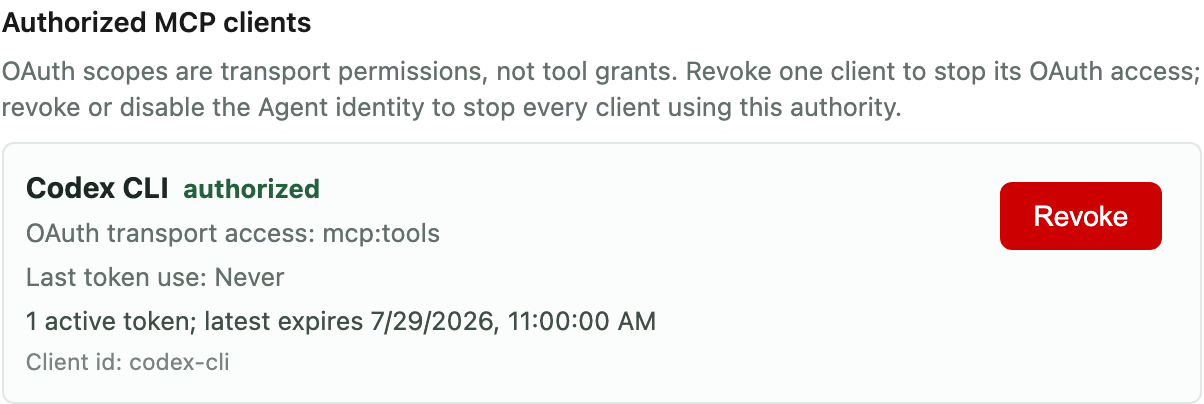
Codex CLI shown as an authorized MCP OAuth client with separately revocable transport access
OAuth example: the client is authorized for MCP transport and can be revoked separately. Its Agent identity grants still decide which tools it may use.

Codex CLI

The real-client smoke for Codex CLI 0.145.0 validated MCP registration, bearer-token environment setup, config/list output, and OAuth registration and login command flags. It did not run a model session.

export EXECWARDEN_MCP_URL="https://YOUR_GATEWAY_HOST/v1/mcp" export EXECWARDEN_MCP_TOKEN="YOUR_AGENT_IDENTITY_TOKEN" codex mcp add execwarden-bearer \ --url "$EXECWARDEN_MCP_URL" \ --bearer-token-env-var EXECWARDEN_MCP_TOKEN codex mcp list --json
Expected successThe configured server appears in codex mcp list --json, with the ExecWarden URL and bearer-token environment configuration present.
OAuth hintsCodex CLI 0.145.0 exposes --oauth-client-id and --oauth-resource in codex mcp add --help, and --scopes in codex mcp login --help.
Useful follow-upAfter setup, inspect MCP & API to see what the identity can discover and invoke.

Claude Code

The real-client smoke for Claude Code 2.1.217 validated MCP registration, bearer-header connectivity, OAuth client-id setup, and the connected-server list output. It did not run a model session.

export EXECWARDEN_MCP_URL="https://YOUR_GATEWAY_HOST/v1/mcp" export EXECWARDEN_MCP_TOKEN="YOUR_AGENT_IDENTITY_TOKEN" claude mcp add --transport http --scope user execwarden-bearer \ "$EXECWARDEN_MCP_URL" \ --header "Authorization: Bearer $EXECWARDEN_MCP_TOKEN" claude mcp add --transport http --scope user execwarden-oauth \ "$EXECWARDEN_MCP_URL" \ --client-id claude-code claude mcp list
Expected successThe list view shows the configured server as connected.
OAuth directionThe tested CLI setup confirms OAuth client-id configuration, but full browser OAuth validation remains a separate step.
Use with GitHubAfter setup, the GitHub Quickstart shows the concrete repo and branch boundary.

OpenCode

The real-client smoke for OpenCode 1.18.4 validated a remote MCP config, bearer authentication, server-list output, and the command surface for MCP setup. It did not run a model session.

{ "$schema": "https://opencode.ai/config.json", "mcp": { "execwarden-bearer": { "type": "remote", "url": "https://YOUR_GATEWAY_HOST/v1/mcp", "enabled": true, "oauth": false, "headers": { "Authorization": "Bearer YOUR_AGENT_IDENTITY_TOKEN" } }, "execwarden-oauth": { "type": "remote", "url": "https://YOUR_GATEWAY_HOST/v1/mcp", "enabled": false, "oauth": { "clientId": "opencode", "scope": "mcp:resources mcp:tools offline_access" } } } }
opencode mcp list --pure
Expected successThe configured server appears in the MCP list against a live gateway.
OAuth directionEnable the execwarden-oauth entry and run opencode mcp auth when you want the OAuth path. The smoke confirms that command surface; full interactive OAuth remains follow-up work.
Practical useUse this path when you want a client-side config file instead of a one-shot command.

Optional OAuth

OAuth is a transport choice, not the authority boundary itself. The same identity and grants still decide which tools are visible. ExecWarden exposes these discovery endpoints:

Protected resourcehttps://YOUR_GATEWAY_HOST/.well-known/oauth-protected-resource/v1/mcp
Authorization serverhttps://YOUR_GATEWAY_HOST/.well-known/oauth-authorization-server
Authorizehttps://YOUR_GATEWAY_HOST/v1/mcp/oauth/authorize
Tokenhttps://YOUR_GATEWAY_HOST/v1/mcp/oauth/token

The verified smoke covers registration/config/bearer connectivity and command availability, not full model sessions. Cursor Desktop, exact installed-client screenshots, and any client-specific static registration are still follow-up work.

Troubleshooting

No tools appearCheck the active Agent identity grants. OAuth transport scopes alone do not expose tools.
Tool pausesAsk-mode grants intentionally return a pending approval response for exact payload review.
Bearer setup works, but access is narrowThat is usually the intended state. Expand the per-tool grant only after reviewing the first run.
Need the reference pageOpen MCP & API for the transport model and remote connector reference.